Check if your user has sufficient privileges to do this: Types of users and their privileges
You can create new Workspace by clicking on “Organization settings” in the left sidebar menu. Then select the “Workspace” tab at the top. On this tab, you should see an overview of created Workspaces and a tile with “Add new workspace”.
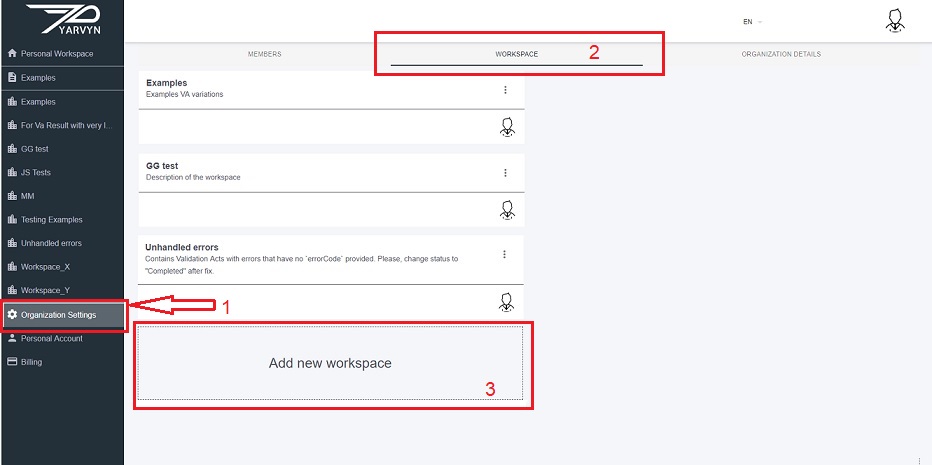
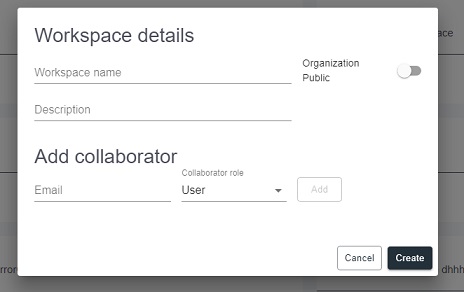
By clicking on the "Add new workspace" tile, a dialogue pops up:
Selecting type of Workspace
By default, the Workspace type is set as “Organization Workspace”, you can switch on the “Organization Public” option.
The main difference between the two is, in short, the Organization Public Workspace is available to any member of the Organization while Organization Workspace can be also shared externally.
Adding Collaborators:
Depending on Workspace type you can add collaborators and depending on your Subscription plan you can assign them roles (these are not the same as their user privileges). The default “User” role means anyone can create / edit Validation Acts in the Workspace.
Comments
0 comments
Please sign in to leave a comment.